Professional PUBG Mobile broadcast HUD
Premium PUBG Mobile HUD for professional PUBG Mobile broadcasts
Premium HUD for PUBG Mobile was created to provide all the crucial information for the viewers, no matter if they watch on desktop or mobile devices. All the elements in the spectator HUD resonate PUBG Mobile aesthetics and become the integral part of the whole spectacle. With many dedicated statistics, comparisons, and summaries, PUBG Mobile Premium HUD is the ultimate spectator overlay for every event!
Trusted by


One connected workflow
One Premium HUD for the entire PUBG Mobile broadcast
Keep live match presentation, broadcast data, overlays, and production settings inside one connected LHM workflow.
What PUBG Mobile Premium HUD has to offer
Detailed match statistics
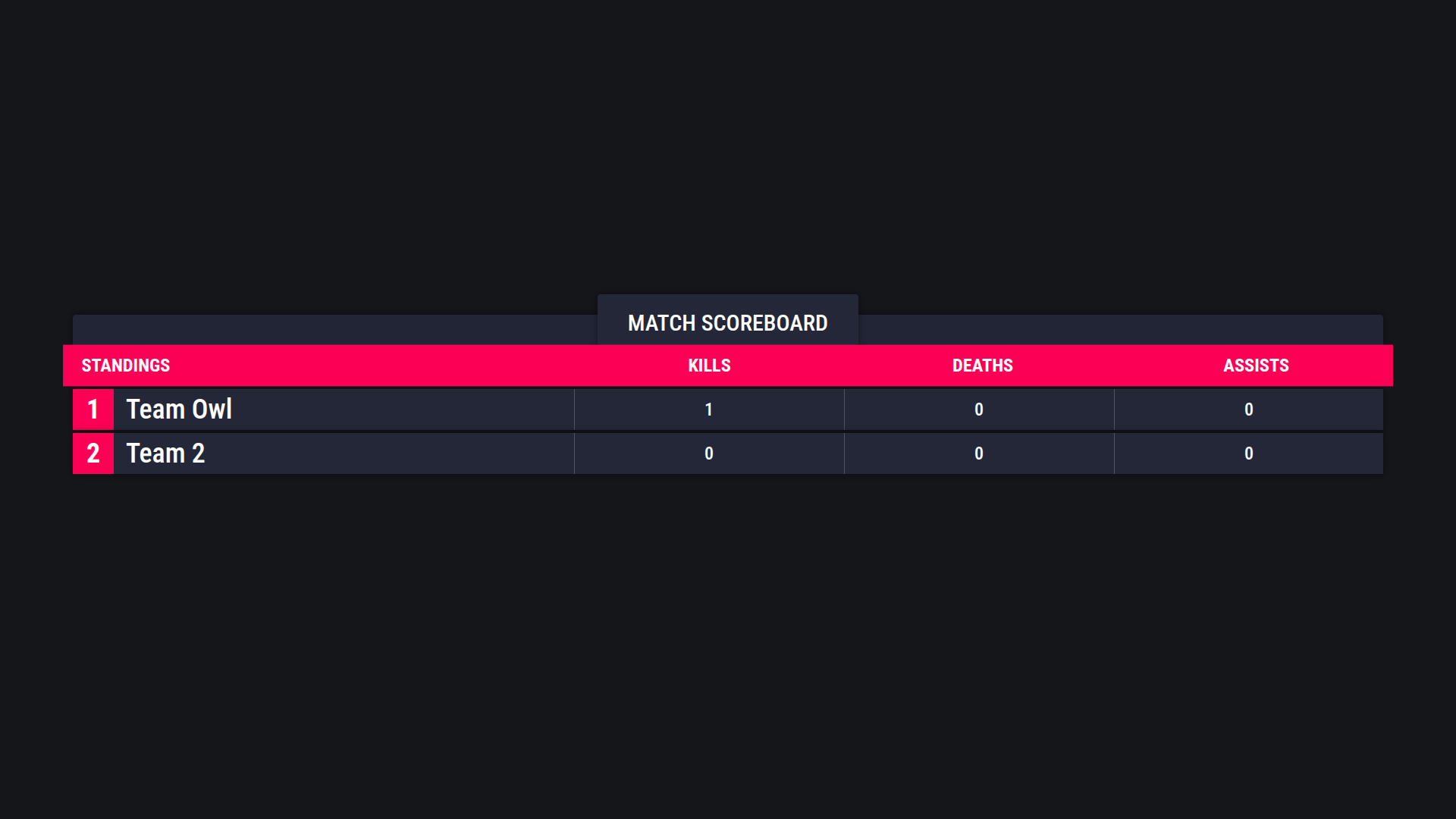
The overlay offers dedicated insights and statistics like fullscreen scoreboard with all teams and their results, list of all players' statuses and their match stats, and player summary screen with various match statistics.

Broadcast-ready match data
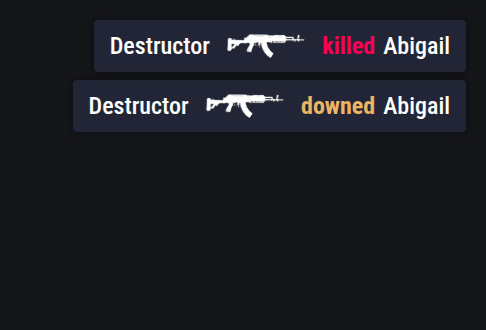
Premium HUD for PUBG Mobile comes with a dedicated killfeed with information about the causer, the victim and the weapon used, information about the currently observed player, their weapons, ammo, health and more, and information about the team of the currently observed player available at a glance.

Multiple color palettes
Professional and Enterprise plans also include several color palettes to choose from!
What PUBG Mobile Premium HUD has to offer

Detailed match statistics
The overlay offers dedicated insights and statistics like fullscreen scoreboard with all teams and their results, list of all players' statuses and their match stats, and player summary screen with various match statistics.

Broadcast-ready match data
Premium HUD for PUBG Mobile comes with a dedicated killfeed with information about the causer, the victim and the weapon used, information about the currently observed player, their weapons, ammo, health and more, and information about the team of the currently observed player available at a glance.
Multiple color palettes
Professional and Enterprise plans also include several color palettes to choose from!
Plan availability
Choose the right PUBG Mobile HUD setup
Start with the core match HUD in Personal. Professional and Enterprise add the production screens and visual options needed for larger broadcasts.
Personal
Core match HUD
Standard HUD functionality
Default color palette
Matchbar
Player list
Scoreboard
Cameras support
Player overview panel (2 variants)
Scoreboard view
Team overview panel
Professional & Enterprise
Everything in Personal, plus
Killfeed
More data in Player overview panel
Several color palettes to choose from
Connected LHM workflow
PUBG Mobile HUD, overlays, data, and production in one stack
LHM Cloud
Keep HUD presets, match data, teams, players, and production settings in one cloud workflow.
Learn moreBroadcast management
Manage tournaments, broadcasts, and overlays from the same production workspace.
Learn morePlayers, teams, and matches
Prepare the game data used by your HUD before the broadcast begins.
Learn moreLHM Cameras
Add player camera feeds to supported online and on-site production workflows.
Learn moreLHM Replays
Bring replay clips into the same workflow used for the live broadcast.
Learn moreHUD management
Launch and manage broadcast HUDs without rebuilding your production setup.
Learn moreAvailable from Personal
Start building a broadcast-ready PUBG Mobile Premium HUD setup
The PUBG Mobile Premium HUD is available with Personal, Professional, and Enterprise plans. Register to start your setup or compare the plans before choosing your production package.
PUBG Mobile Premium HUD FAQ
Premium HUD for PUBG Mobile was created to provide all the crucial information for the viewers, no matter if they watch on desktop or mobile devices. All the elements in the spectator HUD resonate PUBG Mobile aesthetics and become the integral part of the whole spectacle. With many dedicated statistics, comparisons, and summaries, PUBG Mobile Premium HUD is the ultimate spectator overlay for every event!
The PUBG Mobile Premium HUD is available with Personal, Professional, and Enterprise plans. Professional and Enterprise include the additional production screens and visual options listed in the plan comparison.
Yes. The PUBG Mobile Premium HUD is launched and managed through LHM Cloud together with the data and settings used by your broadcast.
Premium HUD designs like color schemes, fonts, and shapes cannot be modified. If you need a custom HUD for PUBG Mobile you can create your own one thanks to the open source PUBG Mobile default HUD (source code available very soon!) that you can modify and use in LHM.
Need a tutorial? Take a look at our user guide and learn how to use the PUBGM Premium HUD and configure it to your needs!
Find the right look for your broadcast
Explore production-ready HUDs for every supported game.
Browse all HUDs & Overlays