Live match HUD
Run the complete Ultra Dota 2 HUD throughout the match with configurable display modes, colors, and production presets.
Esport Broadcasting Powerhouse
Ultra Dota 2 HUD is the complex spectator and observer experience. There was no solution on the market that provided additional information, blended into the interface from the game, and was accessible to everyone with a super-easy setup.


One connected workflow
Ultra Dota 2 HUD connects every stage of your broadcast, from the draft and live match to post-match analysis and studio segments. Match data, event branding, overlays, and saved presets stay together in LHM Cloud, so the production moves as one system.
With a huge amount of additional information, statistics, and comparisons, you know and understand more about the game. Ultra Dota 2 HUD offers advanced features like lane efficiency, lane movement, gold breakdowns, damage dealt, bounty rune overview, Roshan information, courier insights and many more!
Choose the most fitting color scheme for your transmission and event, and showcase the Dota 2 Draft, game, Dota 2 Scoreboard, and roster with Ultra Dota 2 HUD Settings or dedicated, configurable keybinds. Decide about the visibility of courier kills, courier details, and Roshan state. LHM serves all for ease of use.
Stream with the high resolution to offer unforgettable experiences for your viewers with crystal clear visuals - so no detail will be lost!
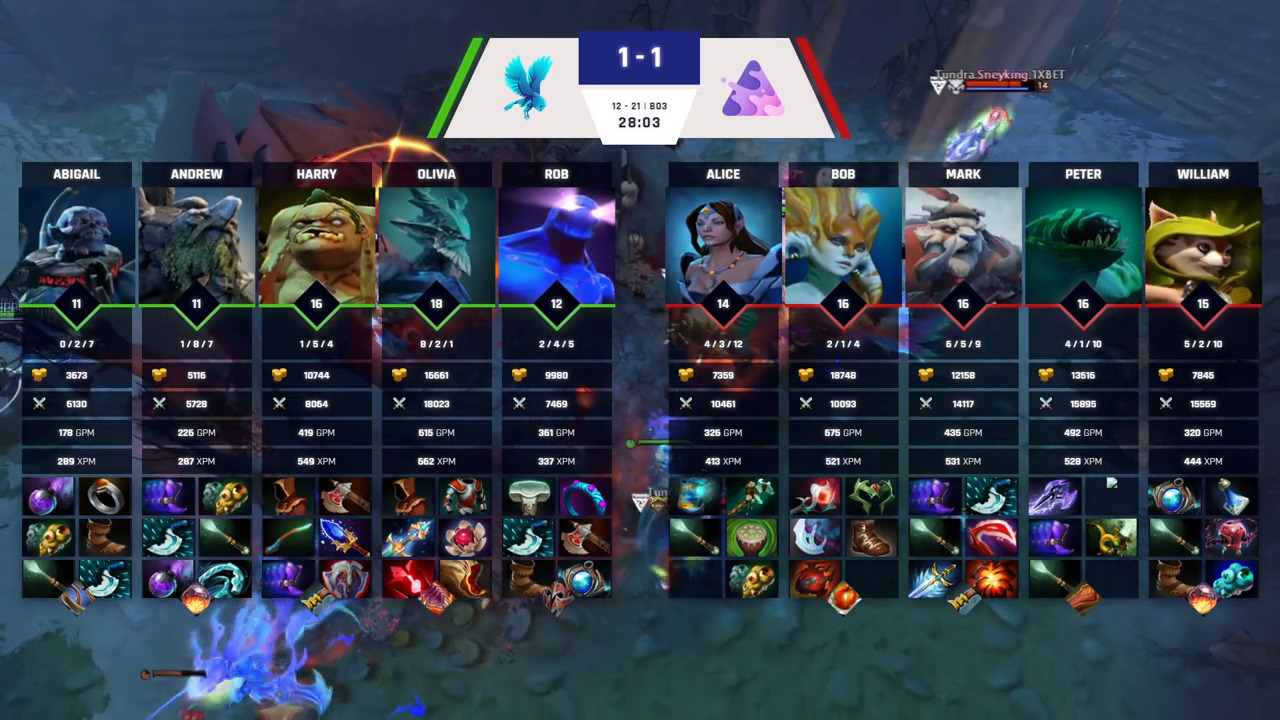
With a huge amount of additional information, statistics, and comparisons, you know and understand more about the game. Ultra Dota 2 HUD offers advanced features like lane efficiency, lane movement, gold breakdowns, damage dealt, bounty rune overview, Roshan information, courier insights and many more!
Choose the most fitting color scheme for your transmission and event, and showcase the Dota 2 Draft, game, Dota 2 Scoreboard, and roster with Ultra Dota 2 HUD Settings or dedicated, configurable keybinds. Decide about the visibility of courier kills, courier details, and Roshan state. LHM serves all for ease of use.
Stream with the high resolution to offer unforgettable experiences for your viewers with crystal clear visuals - so no detail will be lost!
More built in
A window displaying Roshan's status - its health or when it is going to respawn
Information about the sources of gold received by a particular player in the form of a pie chart
A board displaying the progress of both teams in acquiring neutral items and comparing the time at which both teams completed given tiers
A screen displaying details about the most valuable player in the game, their photo, name, and statistics
A bar showing the distance between the courier and the hero, letting viewers track progress of item deliveries
A popup displayed when someone kills an enemy courier, along with items that were carried by the courier at the moment of its death and their value
An easy way to compare networth value and its difference
A heatmap comparing movement of two players on the minimap, showing how they're moving and whether they're roaming
A small pop-up showing up under hero avatars, displaying whether they're teleporting and how much time will it take them
Custom image bars for sponsor or tournament logo
Connected LHM workflow
Keep presets, match data, teams, players, and HUD configuration in one cloud workflow.
Learn moreAdjust the HUD colors and selected visual elements, then reuse saved production presets.
Learn morePrepare teams, players, matches, and the data that powers your broadcast overlays.
Learn moreConnect tournament structure and results with production-ready bracket overlays.
Learn moreCarry the same event identity into analysis, studio, and post-match segments.
Learn moreOrder a fully bespoke HUD implementation when your production needs a unique visual system.
Learn moreAvailable for Professional and Enterprise
Ultra Dota 2 HUD is available for the Professional plan and Enterprise plan starting from 3 seats. Register to start your setup or compare plans before choosing the right production package.
Ultra Dota 2 HUD is a professional observer and spectator overlay for Dota 2 broadcasts. It connects the draft, live match, post-match analysis, tournament brackets, and studio screens in one production workflow.
Ultra Dota 2 HUD can show advanced match data such as Roshan status, gold breakdowns, neutral items, net worth, lane movement, courier activity, Town Portal Scroll indicators, and MVP details.
Yes. Ultra HUD Editor lets you adjust colors and selected visual elements, create dedicated presets, and save them in LHM Cloud. The Ultra HUD codebase is not shared, but you can order a fully custom Dota 2 HUD from LHM or use the open-source Dota 2 default HUD as a starting point.
Yes. Ultra Dota 2 HUD includes native 4K resolution support, so its broadcast graphics remain clear and detailed in high-resolution productions.
Ultra Dota 2 HUD is available with the Professional plan and with the Enterprise plan starting from three seats.
The LHM user guide includes a dedicated Ultra Dota 2 HUD tutorial explaining how to use and configure it for your production.
Explore production-ready HUDs for every supported game.
Browse all HUDs & Overlays