
What Makes a Good League of Legends Broadcast Overlay?
A League of Legends broadcast overlay is a match-reading system first and a branded frame second. It should tell viewers who is ahead, why they are ahead, what both teams are preparing for, and which information matters at that moment.
That requires more than placing team logos around the spectator feed. A production-ready League of Legends overlay needs a clear information hierarchy, reliable data, predictable display states, readable graphics, and enough flexibility to handle the situations that can occur during a live series.
What a League of Legends Broadcast Overlay Actually Needs to Do
A useful LoL broadcast overlay operates on three levels.
It communicates the current match state. Viewers should be able to identify the teams, series score, game time, team kills, gold, towers, and major objective situation without waiting for a caster to explain them.
It supports the story of the match. League is often decided through accumulated advantages rather than one isolated play. The overlay should help viewers connect a completed item to an upcoming Dragon fight, a tower lead to a gold advantage, or an unavailable defensive spell to a possible engage.
It gives the event a consistent visual identity. Colors, typography, team presentation, sponsor inventory, lower thirds, draft graphics, and post-game screens should feel like parts of the same broadcast package.
The design must also respect the observer feed. Graphics should support what the observer is showing instead of competing with the camera. When the observer cuts toward Baron, the overlay should make the objective state easier to understand. When a base defense begins, the overlay should leave enough visual space for the fight.
Core Information a LoL Broadcast Overlay May Need to Display
Match and series context
The persistent match bar should identify both teams through clear names and logos. It should also distinguish the series score from the current game state.
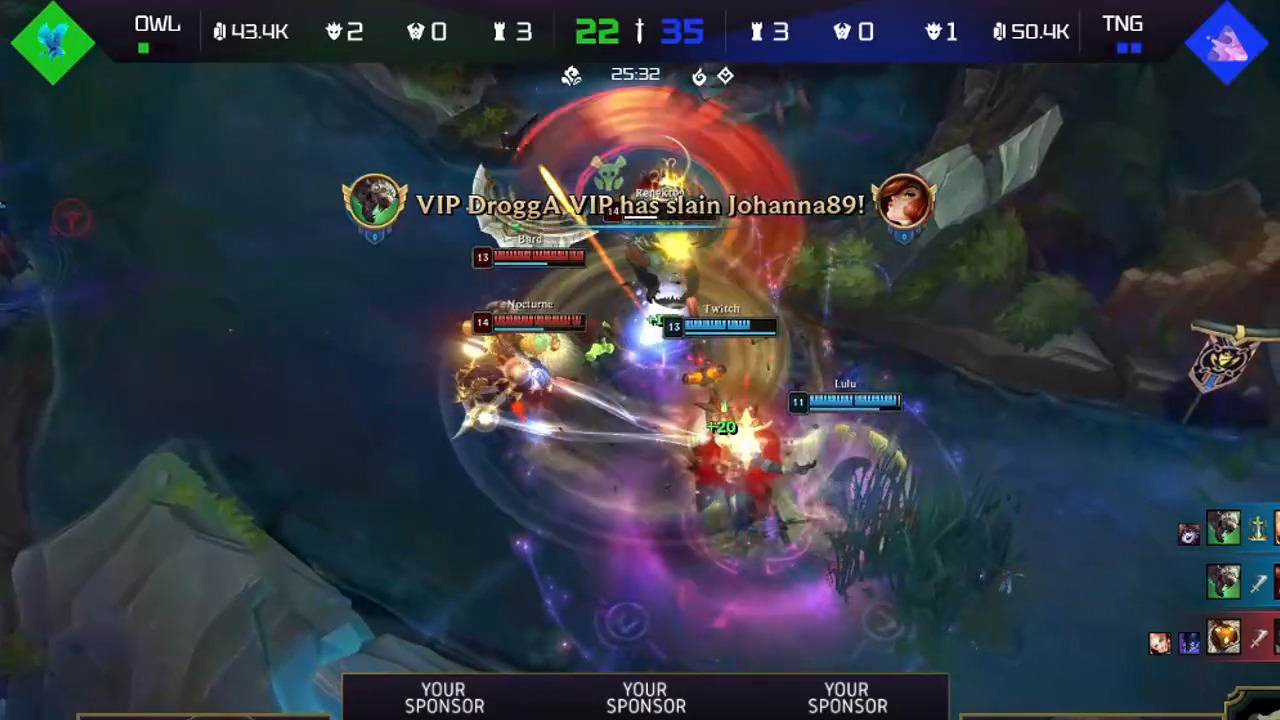
A viewer should not have to guess whether “1–0” means a series lead, the number of games won, or the current kill score. Labels, positioning, or visual grouping should make the distinction obvious.
The match context may include:
- Team names and logos
- Current game number
- Series score
- Match format, such as best-of-three or best-of-five
- Game timer
- Blue-side and red-side indicators
- Team kill totals
- Team gold totals or gold difference
- Tower counts
- Major objective counts or status
Side indicators matter even when the event uses strong team branding. A red-branded team may be playing on blue side, so team identity and map side should not rely on the same color cue.
Player and champion information
Player panels should let viewers identify each competitor and understand their current combat state.
Depending on available space, data access, and the production’s priorities, these panels may show:
- Player name
- Champion portrait or champion name
- Role
- Level
- Kills, deaths, and assists
- Items
- Gold or another economy indicator
- Summoner spells
- Ultimate availability
- Relevant status effects
Champion portraits are fast to recognize, while text labels help viewers who do not immediately identify every portrait. Using both can improve clarity, provided the labels remain readable.
Player ordering should remain consistent. A common structure places top, jungle, mid, bot, and support in the same vertical order on both sides. Consistency lets viewers compare lane opponents without searching through the interface.
Economy and objective information
League of Legends production depends heavily on economy and map-state data. The overlay should give viewers enough information to understand why a team is contesting, delaying, trading, or disengaging.
Potentially useful fields include:
- Team gold
- Gold difference
- Individual items
- Completed-item indicators
- Towers destroyed
- Dragon count and Dragon type
- Dragon Soul status
- Baron Nashor status
- Rift Herald status
- Elder Dragon status
- Objective spawn or respawn timers
- Active Baron or Elder buff duration
- Inhibitor state
Not every production needs to display all these fields. Any information shown during the broadcast should have a reliable data source and a clearly defined fallback state.
The design must also distinguish different kinds of numbers. A countdown to an objective spawn is not the same as the remaining duration of an active buff. Using the same icon and timer treatment for both creates avoidable confusion.
Map, event, and commercial context
The minimap is already one of the densest areas of the spectator interface. Any custom framing around it should preserve its usable size and visibility.
Map-related information may include ward visibility, lane pressure, split-push positions, objective setup, or rotations when the required data is available and trustworthy. It should appear only when it adds context.
Event branding and sponsor placements also belong in the information architecture. They need reserved areas rather than whatever space remains after the match UI is designed. That produces cleaner sponsor delivery and reduces the chance of a commercial element covering match-critical information.
Scoreboard and Match State
The scoreboard should answer three questions almost instantly:
- Who is ahead?
- How large is the lead?
- Where did that lead come from?
Team kills alone cannot answer those questions. A team may lead 8–5 in kills while trailing in total gold because the opponent has stronger farm, more tower income, or better objective control.
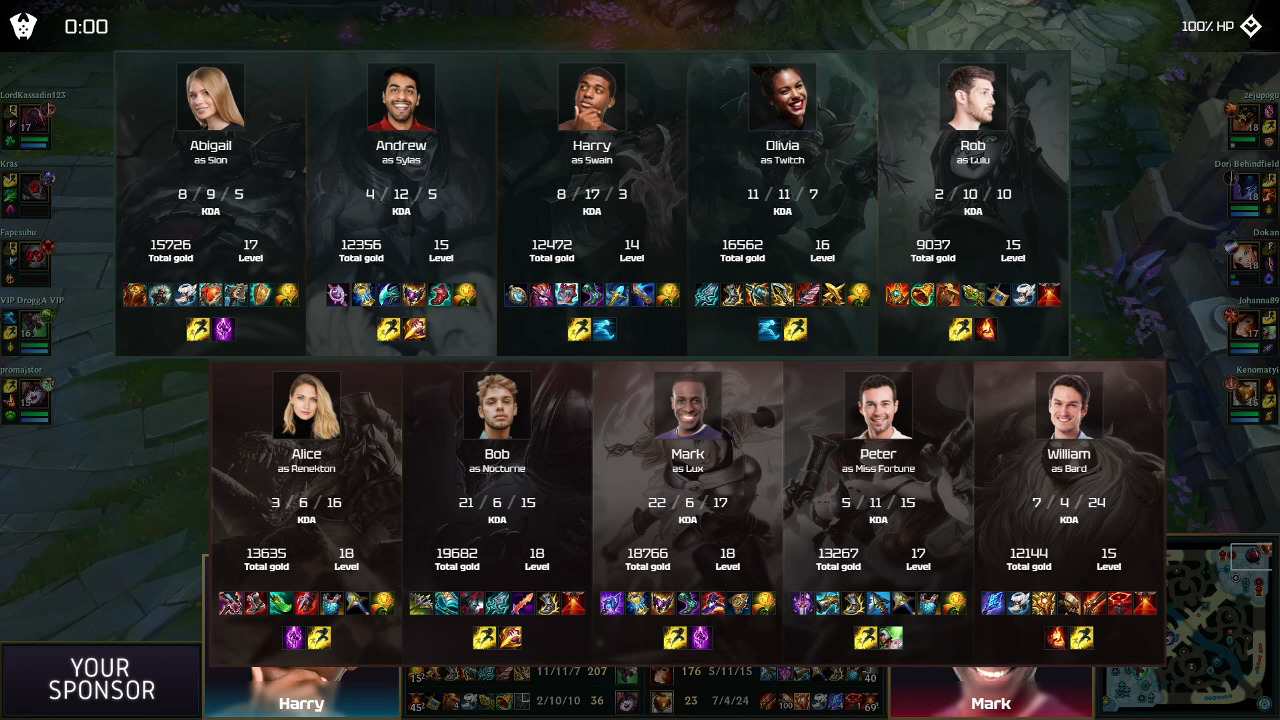
A useful scoreboard can therefore combine several signals:
- Team kills
- Total gold
- Gold difference
- Tower count
- Objective count
- Game time
- Series score
The hierarchy matters. Team names, score, timer, and broad economy should be readable at a glance. Secondary details can sit one level lower.
A viewer joining in the middle of Game 2 should quickly understand that one team leads the series 1-0, the current game is close in kills, and the other side has a meaningful gold and tower advantage. That information should not require opening a full-screen statistics panel.
Side color is also operational information. Blue and red indicators should remain visible even when team brand colors differ. Use labels, shapes, or fixed positions alongside color so that side identity is not dependent on color recognition alone.
Gold, Items, and Power Spikes
Economy is one of the main explanations for what happens next in a League match.
A kill count shows part of the story. Gold and items show how much usable power each team has converted from farming, towers, objectives, bounties, and champion kills.
Team gold and gold difference
Showing both team totals gives useful context about the stage of the game. A 2,000-gold lead at a relatively low total economy can mean something different from the same lead much later in the match.
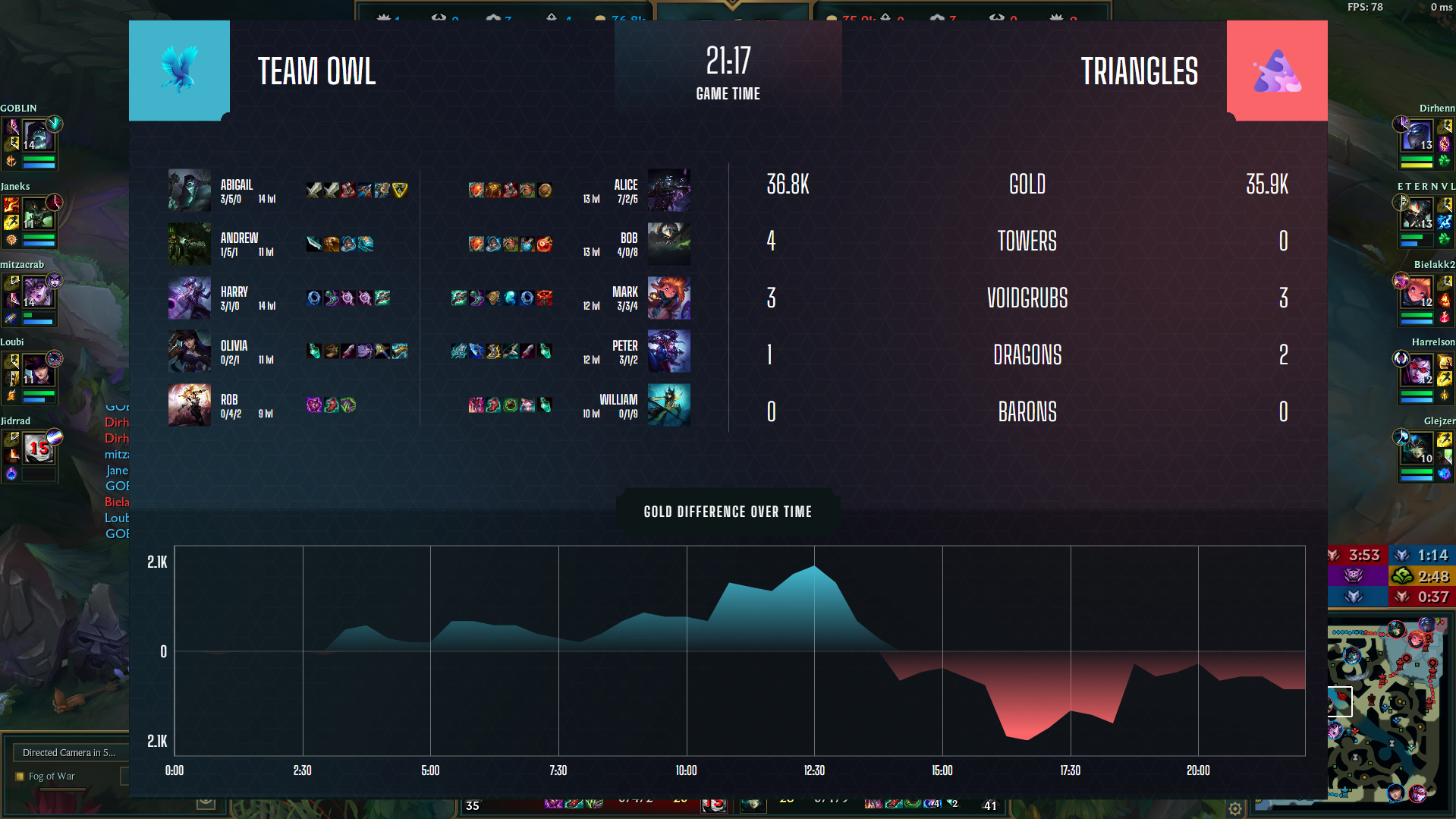
Gold difference makes the advantage faster to read. If space permits, displaying team totals alongside a clearly marked difference is usually stronger than relying on one format alone.
The presentation should also make the direction of the lead unmistakable. A bare “+2.3K” can be misread if it is not clearly attached to one team.
Objectives and Timers
Objective information explains why teams move around the map.
Dragon, Baron Nashor, Rift Herald, Elder Dragon, turrets, and inhibitors shape where teams place vision, when they recall, which lanes they push, and when they are willing to fight. A strong objective area gives viewers context before the action starts.
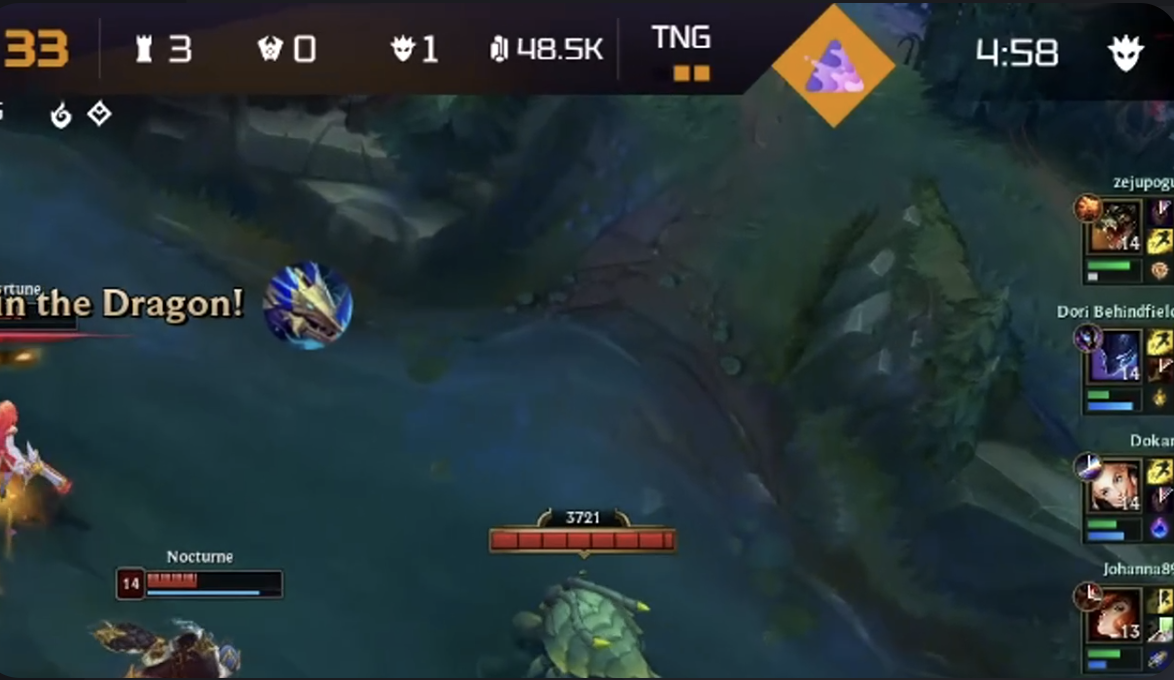
Depending on the available data and the broadcast format, objective information may include:
- Whether an objective is currently alive
- Time until spawn or respawn
- Which team secured the previous objective
- Current Dragon count
- Dragon type
- Soul status
- Active Baron or Elder buff
- Remaining buff duration
- Rift Herald ownership or use
These states should not all look identical. A live objective, an upcoming objective, and an active team buff are different pieces of information.
Objective logic can also change with the game patch or mode. Rift Herald remains part of standard Summoner’s Rift in 2026, but it is not present in Swiftplay.
Production teams should therefore treat the game patch and mode as configuration inputs rather than hard-code one permanent objective model.
Objective trades need context
A team giving up Dragon may be taking a top-side tower, Rift Herald, or significant farm elsewhere. Showing only the Dragon icon can make a deliberate trade look like an unexplained mistake.
The observer and casters will provide most of that context, but the overlay can support them through accurate tower counts, objective information, and map-state graphics.
Vision information can be useful during Baron and Elder setups when the appropriate data is available. It should use clear, restrained symbols. Filling the minimap with several overlapping markers can make the setup harder to read rather than easier.
Team Fights and Viewer Readability
The overlay should become quieter when the game becomes louder.
During a Baron fight, Dragon contest, tower dive, base defense, or late-game five-versus-five, viewers need to track champions, health bars, spell effects, positioning, and the game’s kill notifications. This is the worst time for an oversized sponsor animation, expanding statistics panel, or decorative transition.
A fight-safe display state should:
- Keep the central gameplay area clear
- Preserve the minimap
- Keep kill notifications readable
- Leave champion health and status information visible
- Avoid unnecessary movement
- Suppress non-essential contextual panels
- Prevent sponsor elements from expanding over the action
This does not necessarily require automatic fight detection. A production can define simplified display states that are triggered manually or used consistently during high-action moments.
Animation should communicate a state change, not delay it. If an objective is secured, the information should update immediately rather than waiting for a long flourish to finish.
Sponsor placements should remain inside reserved zones. A static sponsor mark in a planned area is easier to manage than a graphic that moves across the screen during unpredictable gameplay.
Show the right information before, during, and after the fight
A detailed item comparison can be helpful ten seconds before a Dragon fight. It is less helpful after both teams engage.
During the fight, prioritize identity, health, death status, objective health, and kill notifications. After the fight, the broadcast can bring back a wider economy summary, replay graphic, or objective recap.
This state-based approach gives the audience useful depth without forcing every statistic onto the screen at once.
Champion, Role, and Player Information
Viewers should be able to identify a champion, connect that champion to a player, and compare the player with the opposing role.
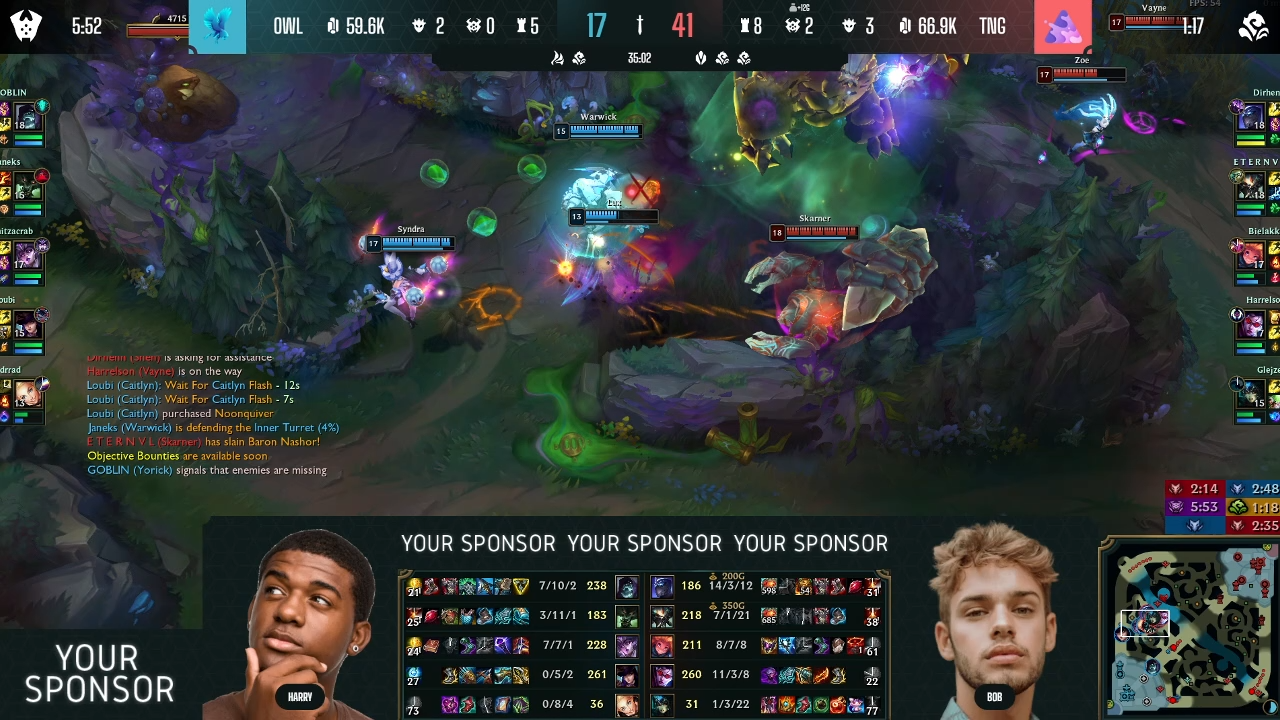
Each player panel should use a repeatable structure. For example:
Champion portrait → player name → level and KDA → summoner spells → items
The precise order can change, but it should remain consistent across all ten players.
Player names
Names need enough width for real rosters, not placeholder text. Test long handles, uppercase names, mixed-case branding, diacritics, and non-Latin scripts before the event.
Truncation rules should be intentional. Cutting a player name without warning can create confusion, while reducing the font until it is unreadable solves one problem by creating another.
Champion and role identification
Champion portraits provide quick recognition. Role icons or stable role ordering make lane comparisons easier.
Text champion names may also be useful in broadcasts aimed at newer audiences or in layouts where portrait artwork is small. Skin artwork should not make champion identification harder.
Summoner spells and ultimate status
Summoner-spell and ultimate indicators can add valuable tactical context, especially before objective fights. Their value depends on accuracy and readability.
A small grey dot may technically indicate that an ultimate is unavailable, but it will not help viewers if the state is difficult to distinguish. Use a clear ready/unavailable treatment and avoid relying on color alone.
If cooldown or availability data cannot be updated reliably, the production should reconsider displaying it. Incorrect tactical information is worse than omitting the field.
Minimap, Vision, and Map Control
The minimap should remain easy to read throughout the game. It already shows champion positions, structures, minions, and map movement, so custom graphics should avoid shrinking it or covering its edges.
Map-related overlays work best when they answer a specific question:
- Which team controls the river before Dragon?
- Where is the split pusher?
- Which lanes are pushing toward a team?
- How is a team setting up around Baron?
- Which side has safe vision access?
- Is a rotation happening through fog of war?
Permanent layers for every possible map statistic usually create clutter. Contextual graphics can appear during analysis, replays, pauses, or quieter setup periods.
Ward and vision displays also need strict visual rules when they are used. Different ward types, team ownership, and expiration information can quickly become too dense.
Use them only where the necessary data is available, the symbols are unmistakable, and the result improves the observer’s story.
The overlay should support the camera decision. It should not attempt to tell a separate story while the observer is showing something else.
Branding and Event Identity
A League of Legends overlay should look like it belongs to the event without making the game harder to follow.
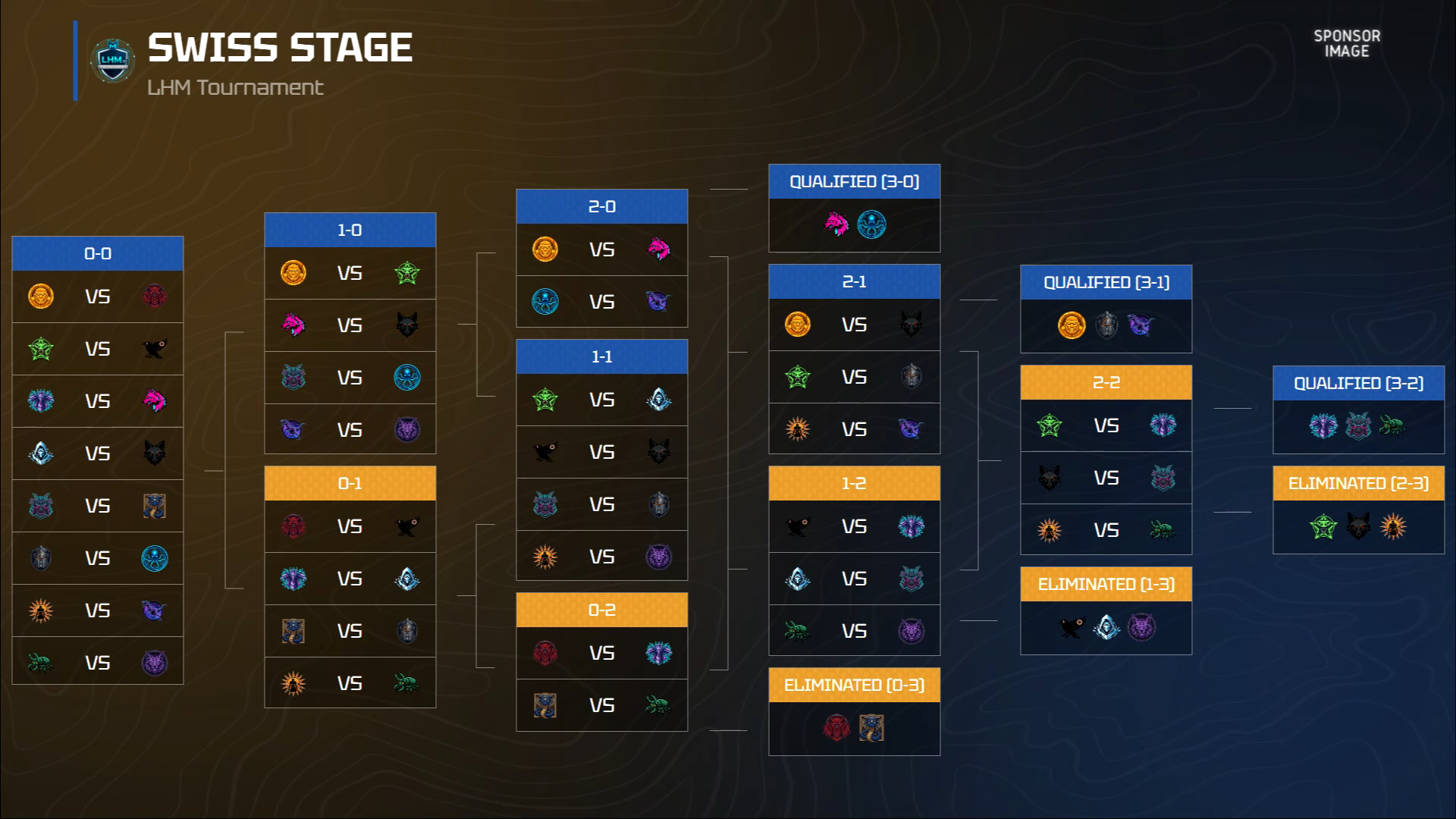
Brand identity can appear through:
- Typography
- Panel shapes
- Accent colors
- Icon treatment
- Transitions
- Team-introduction graphics
- Draft screens
- Lower thirds
- Replay frames
- Break screens
- Brackets and schedules
- Post-game summaries
- Social and promotional graphics
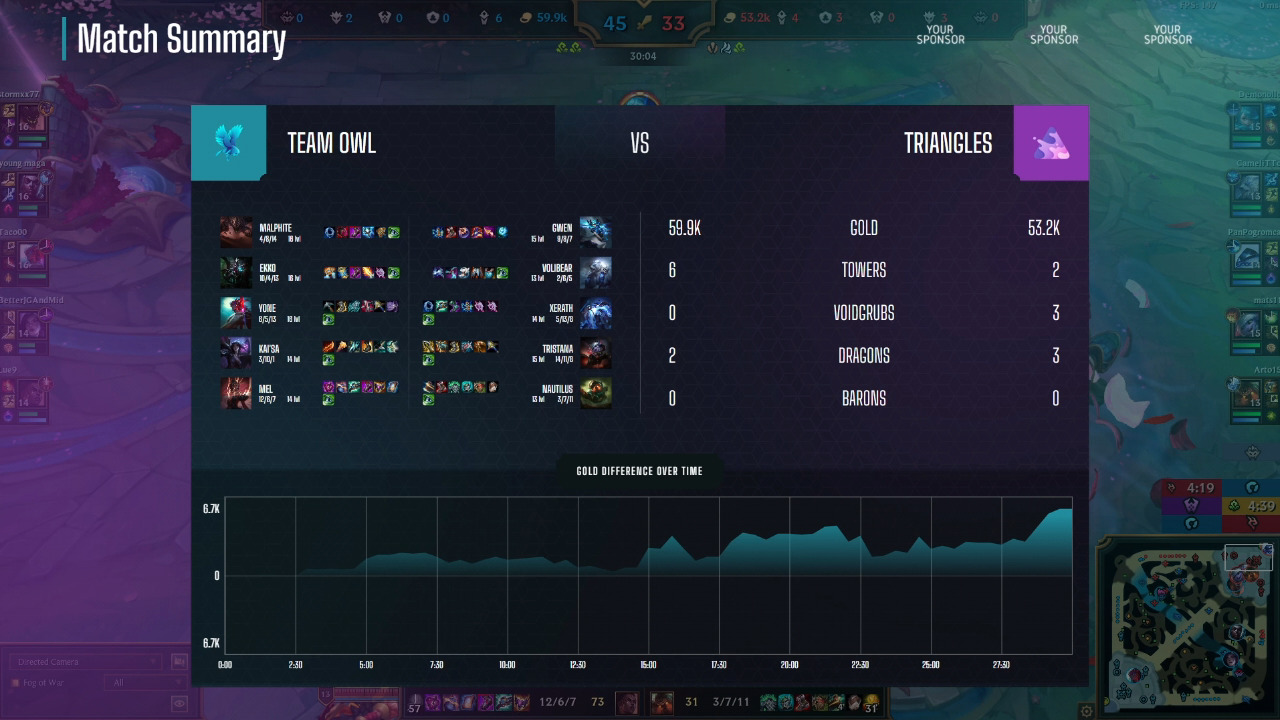
The strongest packages use a shared visual system across these assets. A viewer should recognize the event during draft, gameplay, analyst segments, and post-game coverage without every screen being identical.
Treat sponsor inventory as part of the layout
Sponsor placement should be planned during wireframing rather than added after the match UI is complete.
Define:
- Which sponsor positions remain persistent
- Which placements appear between games
- Which elements can rotate
- How large each asset may be
- What happens when a sponsor file has an unusual aspect ratio
- Which placements are prohibited during live action
Core match information should never be pushed into a smaller or less readable area to accommodate an additional logo.
Break screens, countdowns, replay frames, lower thirds, draft graphics, and post-game screens often provide better commercial space than the in-game HUD.
Readability and Layout Principles
A clean LoL HUD design depends on hierarchy, contrast, spacing, and restraint.
Establish a clear hierarchy
The most important persistent information is usually:
- Team identity
- Game and series state
- Timer
- Broad economy
- Objective state
- Player and champion status
- Secondary statistics
The hierarchy can change temporarily. Before Baron, objective state may become the main focus. During a player feature, individual items and KDA may move higher. The layout should make these shifts deliberate.
Design for the smallest realistic viewing condition
Do not approve the overlay only on a large design monitor.
Test it:
- In the actual program output
- After platform compression
- At 1080p and lower delivery resolutions
- In a small browser window
- On a phone at normal viewing size
- With a busy team fight behind it
Item icons, objective symbols, player names, and sponsor logos are frequent failure points at smaller sizes.
Keep icon language consistent
The same objective should not use one icon in the scoreboard, another in a timer bar, and a third in the post-game summary.
Icons should have recognizable silhouettes and enough spacing. Where an icon could be confused, add a short label rather than expecting viewers to memorize the graphic language.
Limit movement
Motion is useful for score changes, objective captures, or scene transitions. Constant looping animation creates visual noise.
Avoid:
- Pulsing borders around permanent information
- Repeated logo motion
- Long number-counting animations
- Panels sliding in during fights
- Several animated elements competing at once
Movement should direct attention to a meaningful update and then stop.
Custom League of Legends Overlay vs Basic Broadcast Graphics
A custom LoL overlay is useful when the event has enough production needs to justify the added design, development, testing, and operating work.
A custom overlay may make sense for
Recurring leagues. Reusing the package across many match days can justify deeper investment in workflows and templates.
Larger tournaments. More teams, longer series, analysis segments, and expanded sponsor commitments often require a broader graphics package.
Sponsor-heavy events. A custom system can reserve and standardize commercial placements across gameplay, breaks, replays, and post-game screens.
Strongly branded broadcasts. Events seeking a distinct identity may need custom typography, colors, animation, draft graphics, and supporting assets.
Multilingual or regional productions. Dynamic text sizing, alternate typefaces, localized labels, and different sponsor sets need to be considered early.
Productions requiring a full package. Draft, in-game HUD, lower thirds, brackets, schedule graphics, replay frames, pauses, and post-game screens can share one visual system.
Custom League of Legends HUD implementation with LHM
For productions requiring a dedicated visual identity or workflow, we provide custom League of Legends HUD implementation.
A custom project can cover:
- Requirements definition
- Design implementation
- Development
- Quality assurance
- Production support
Depending on the event and confirmed technical scope, the package can include elements such as:
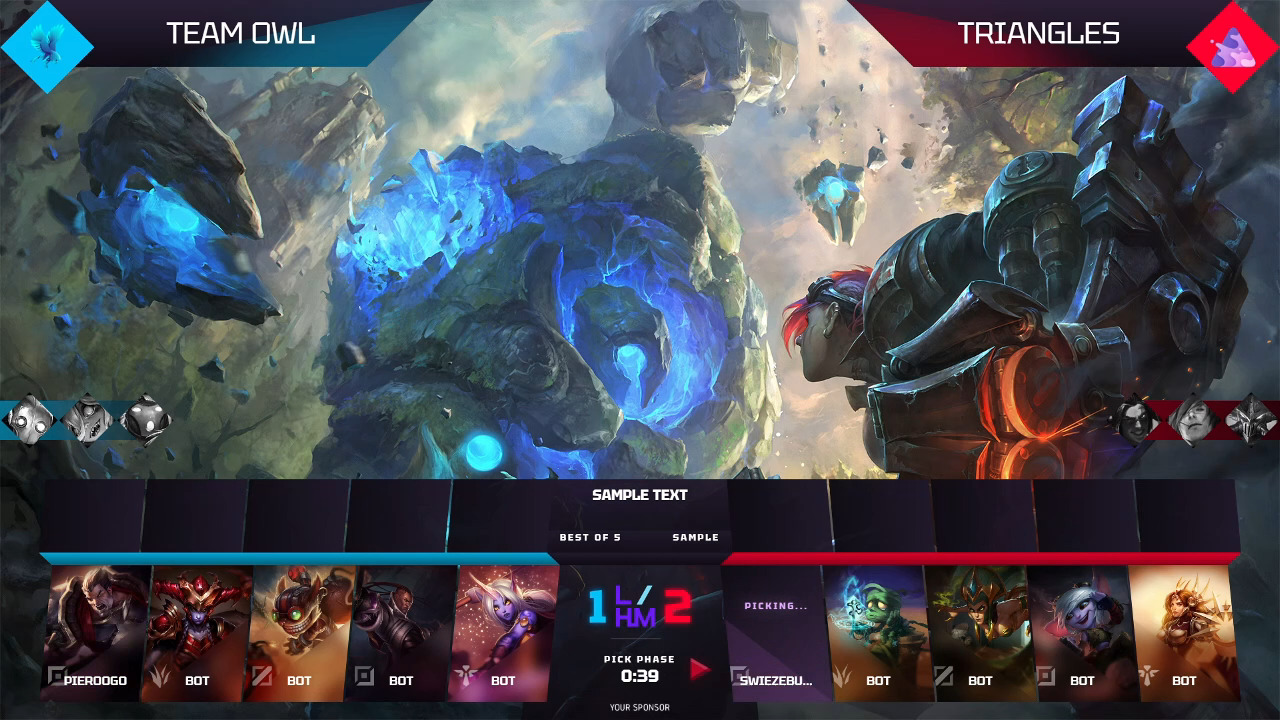
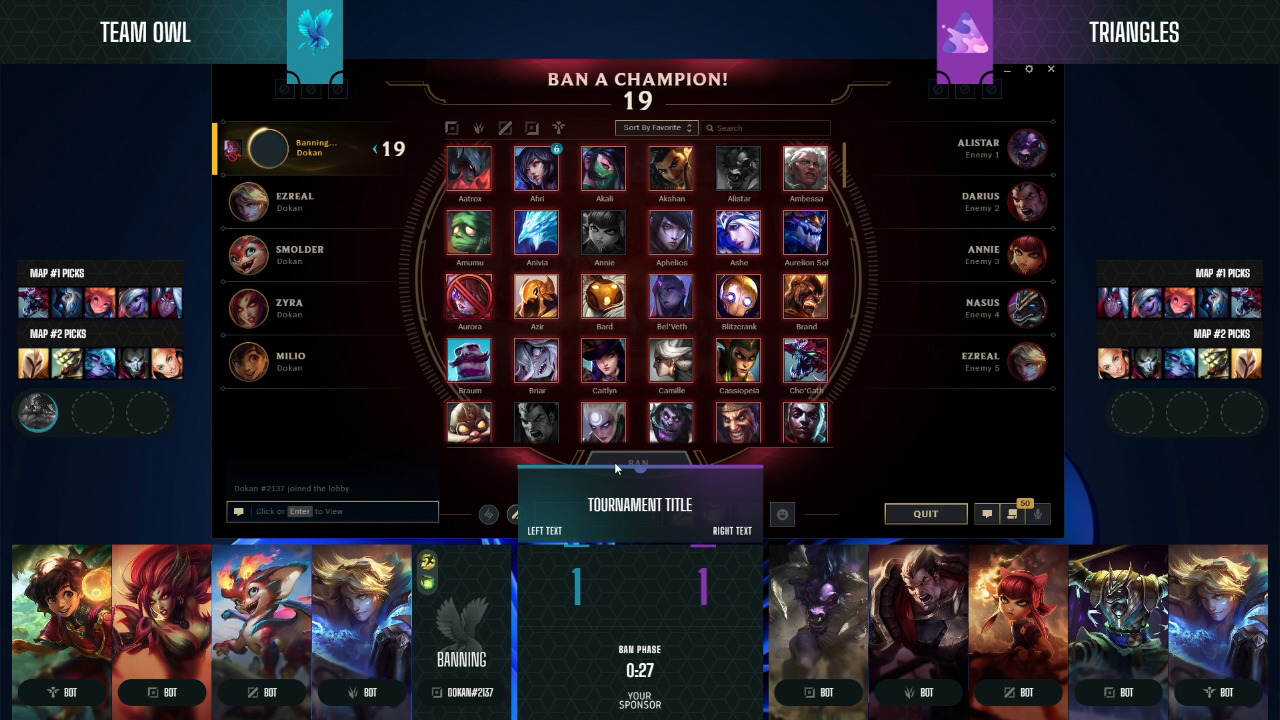
- Draft HUD
- Player Bars
- Custom Matchbar
- Game Scoreboard
- Dragon and Baron bars
- MVP presentation
- Custom sponsor or tournament bars
- Camera layouts
The final scope depends on the event format, technical environment, visual requirements, production workflow, and confirmed data availability.
A simpler setup may be enough for
Small community tournaments. Clear team names, score, timer, basic player information, and readable sponsor placement may cover the main requirements.
Early test events. A simple package allows the production team to validate the event format before investing in a larger system.
Internal competitions. A clean scoreboard and standard spectator information may be all the audience needs.
Low-budget productions. Spending the available time on data accuracy, audio, observing, and operator rehearsal can create more value than adding complex motion graphics.
A custom League of Legends overlay is not automatically better. An under-tested custom HUD can be less useful than a simple, reliable setup.
The right level of complexity depends on the event’s audience, sponsor obligations, frequency, crew size, data access, and ability to test the package properly.
Where LHM Fits
With LHM, production teams can manage League of Legends HUDs and broadcast graphics using real-time game and player data.
Our League of Legends integration includes a Draft Overlay, Custom Matchbar, Game Scoreboard, Dragon and Baron bars, MVP presentation, Player Bars, camera support, and custom image bars for sponsor or tournament content.
The Custom Matchbar can display:
- Team names and logos
- Towers
- Gold
- Dragon and Baron information
- Icons representing Dragons already secured
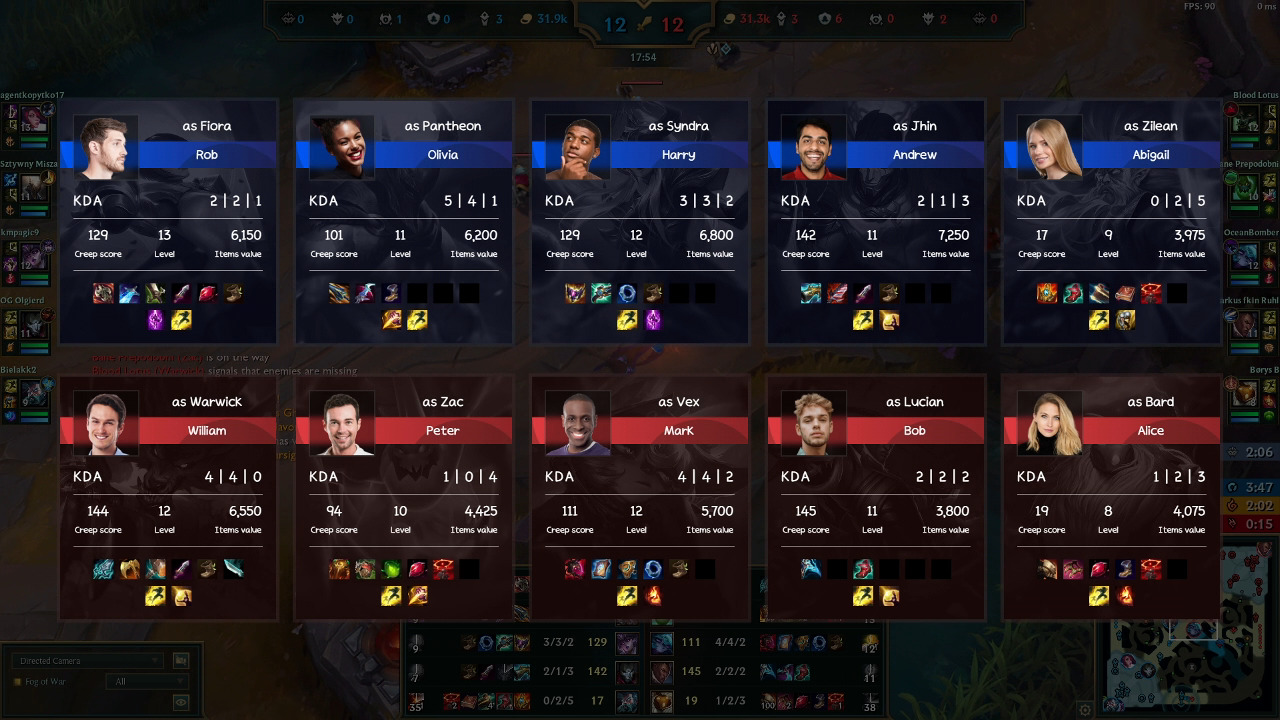
The Game Scoreboard can display:
- Champion imagery
- Champion level
- Player nickname
- Summoner spells
- KDA
- Gold
- Items
Dragon and Baron bars can show objective information, a respawn timer while the objective is unavailable, and a health bar when it is alive.
Ultra LoL HUD
Our Ultra LoL HUD expands the production package beyond the core in-game interface.
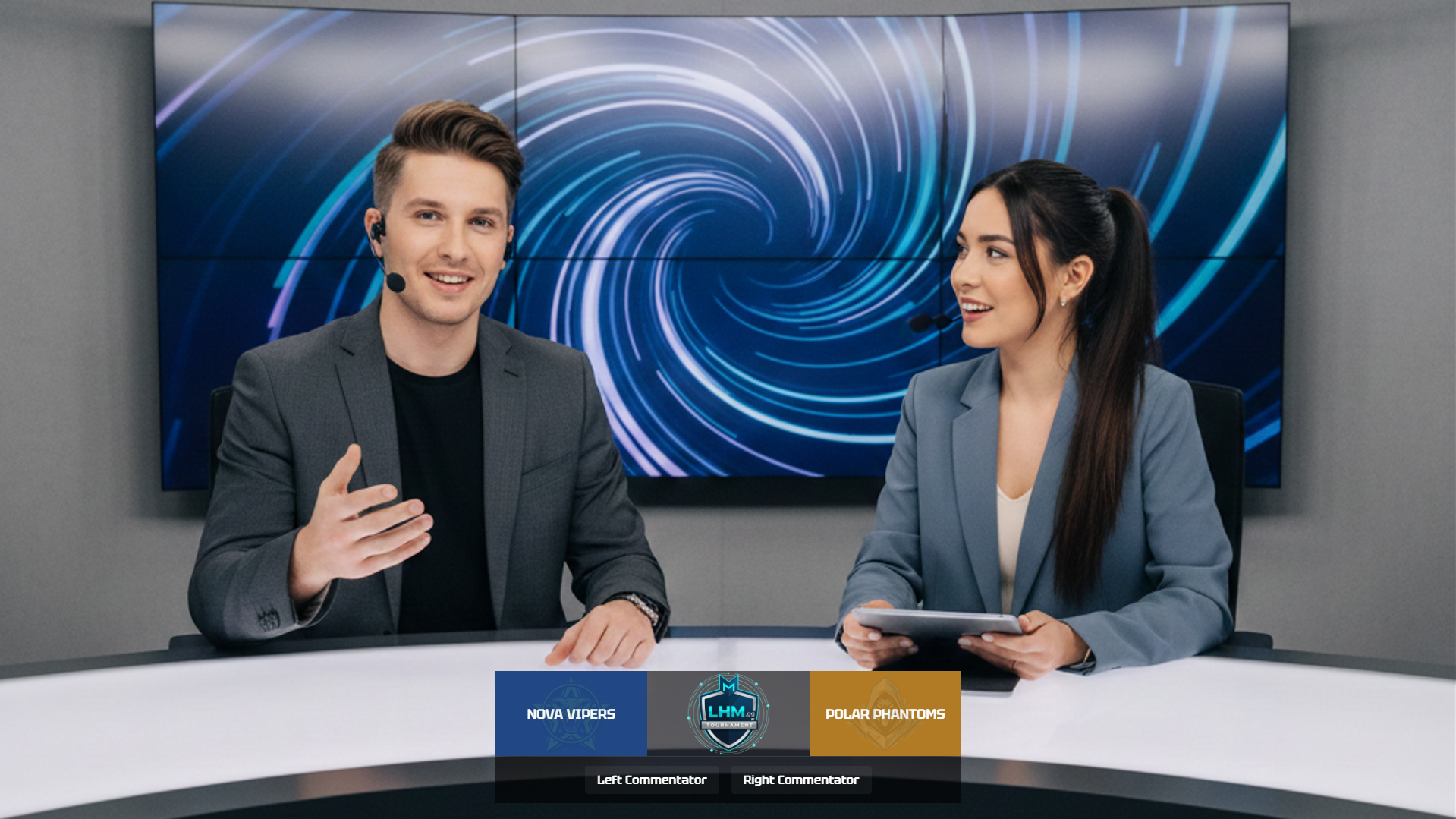
It includes dedicated graphics for:
- Pre-match coverage
- Draft, including Fearless Draft
- In-game presentation
- Post-match presentation
- Tournament brackets
- Studio segments
The Ultra LoL HUD also includes features such as:
- Gold Difference Over Time
- Game Timeline
- Game Summary
- Bounty indicators
- An expanded scoreboard
- MVP presentation
- Sponsor areas
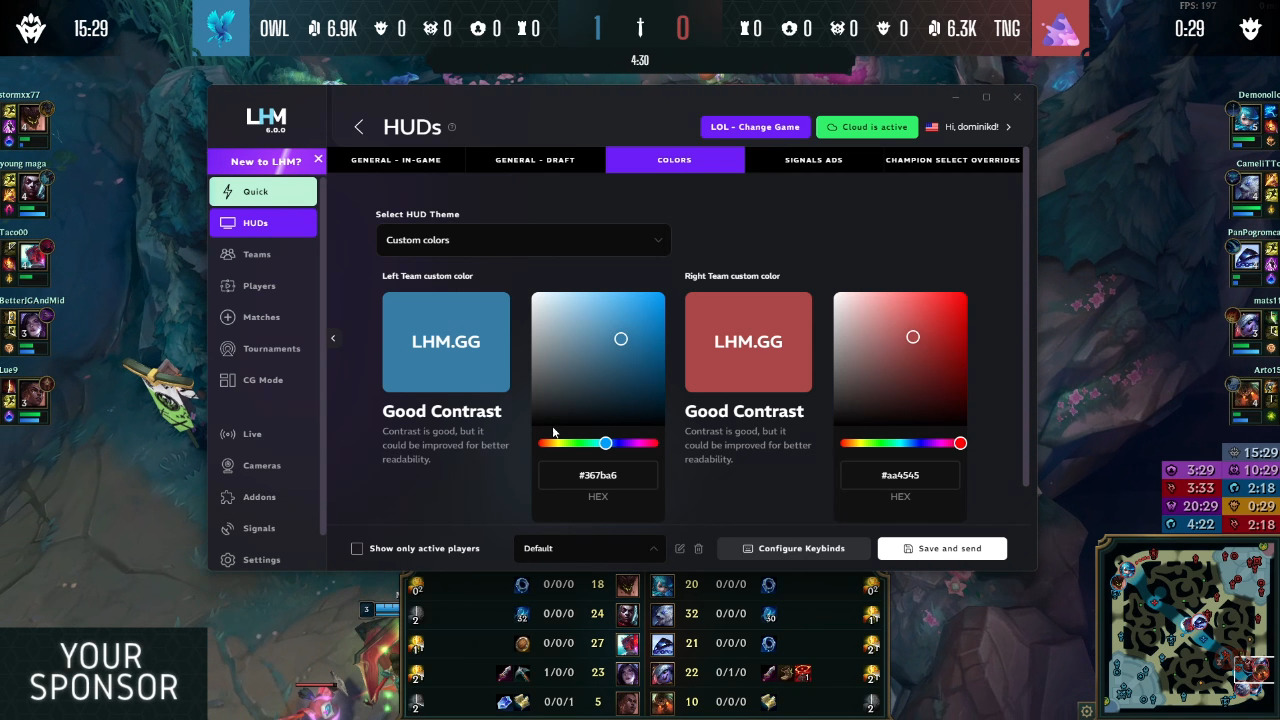
- Editable color schemes
- Configurable display elements
- LHM Cloud presets
- Native 4K support
A Good LoL Overlay Helps Viewers Read the Game
The best League of Legends broadcast overlay makes the match easier to understand without demanding attention for itself.
Gold, items, objectives, champion status, side identity, and map pressure deserve particular care because they explain why teams make their next move. Branding and sponsor visibility should fit around that information rather than weaken it.
More data does not automatically create a better LoL esports broadcast. The right information, shown at the right size and moment, is far more useful than a screen filled with statistics.
Every overlay should be tested during real match scenarios, on the final production signal, and with the people who will operate and observe the event.
If you are planning a League of Legends tournament broadcast, explore our League of Legends HUDs, Ultra LoL HUD, and custom implementation services. You can also use the LHM Network to discover companies and professionals connected with esports, broadcast production, live events, creative work, and production technology.
Frequently Asked Questions
What information should normally remain visible on a League of Legends broadcast overlay?
The persistent display will commonly include team names or logos, blue/red side, game timer, series score, team kills, broad gold information, tower count, and major objective state.
Player and champion panels should remain readable without covering important gameplay areas. The exact persistent information depends on the event format and available data.
Should a LoL overlay show total gold or gold difference?
Both are useful. Total gold gives context about the stage of the game, while gold difference communicates the size and direction of the lead more quickly.
If the layout cannot support both clearly, choose the format that best fits the broadcast and use contextual graphics for deeper economy comparisons.
How much sponsor branding should appear during gameplay?
Use reserved placements that do not interfere with the timer, Matchbar, minimap, player information, kill notifications, or active fight area.
Additional sponsor exposure can appear on draft screens, breaks, lower thirds, replay frames, schedules, studio graphics, and post-game screens.
Does every tournament need a custom LoL overlay?
No. Small community events and test broadcasts may be better served by a simple, accurate, readable setup.
Custom graphics make more sense when the event has recurring broadcasts, substantial branding needs, sponsor commitments, multilingual requirements, or a broader production package.
How should a League of Legends overlay be tested?
Test complete games on the intended patch and mode. Include laning, objective setups, tower dives, team fights, pauses, long games, Baron and Elder situations, game endings, and data interruptions.
Review the final encoded output on both large and small screens.