
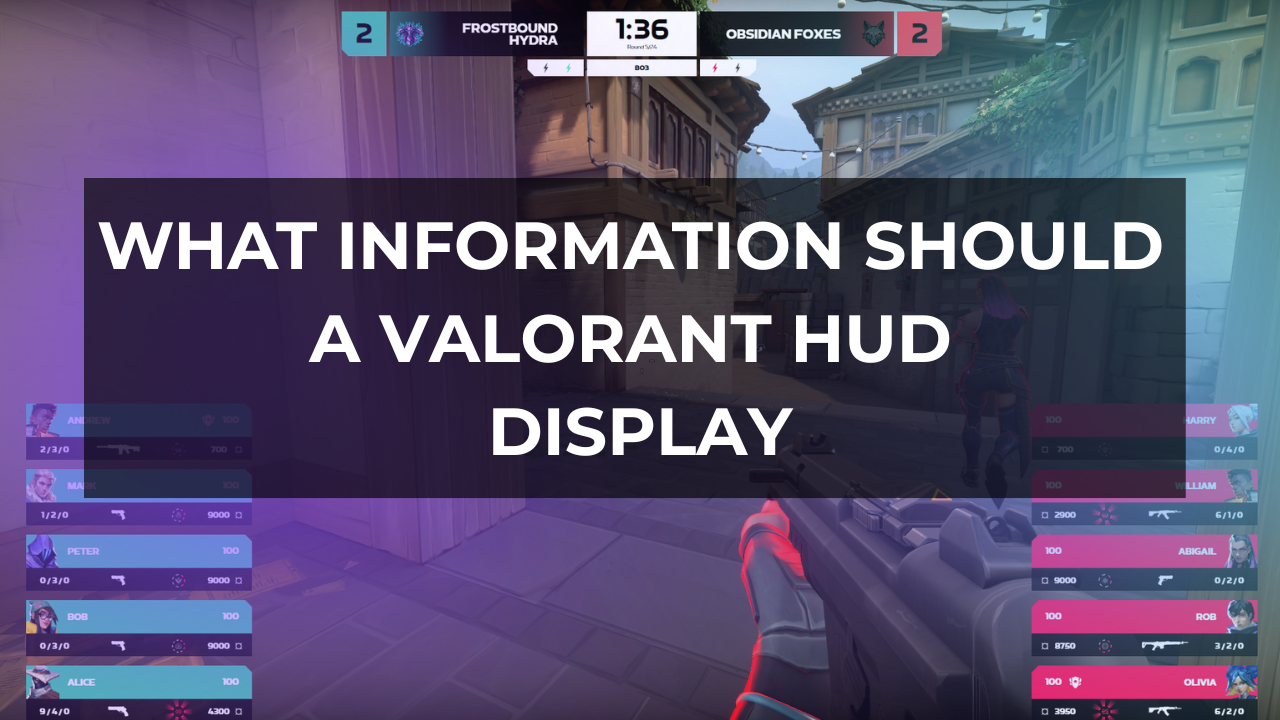
What Information Should a Valorant Overlay Display?
Valorant rounds can turn in a few seconds. A quiet default can become a full site hit. A 5v5 can collapse into a 2v2 retake. A team with weaker weapons can still win the round because one ultimate, one smoke, or one late lurk changes the whole situation.
A good Valorant broadcast overlay should help viewers understand the match state, player status, team economy, spike pressure, agent utility, ultimate availability, and the wider story of the map. It should also leave enough space for the game itself. If the overlay covers key action or forces viewers to search for basic information, it is working against the observer feed.
What a Valorant Overlay Actually Needs to Do
A Valorant overlay should answer the questions viewers ask during a round without making them think too much.
- Who is winning the map?
- Who is alive?
- Who has the spike?
- Who has ultimates?
- Can this team afford another full buy?
- Is this a save, a retake, a clutch, or a late execute?
For production teams, the overlay also has another job. It gives the event a consistent visual identity, keeps team and match information organized, creates space for sponsors where appropriate, and helps casters, observers, and technical staff present the match cleanly.
The best Valorant HUDs usually do a few things well:
- Show the current match state clearly.
- Make player status readable at a glance.
- Give enough economy information to explain buys and saves.
- Show ultimate status without making the screen busy.
- Keep spike, timer, and round pressure visible.
- Support the event brand without competing with gameplay.
- Work during real match conditions, not only in static design previews.
This is especially important in tactical FPS broadcasts because the viewer is rarely watching all ten players at once. The observer chooses one perspective, while the overlay fills in the rest of the context.
Core Information Every Valorant Overlay Should Display
A Valorant tournament overlay should begin with the information viewers need in almost every round.
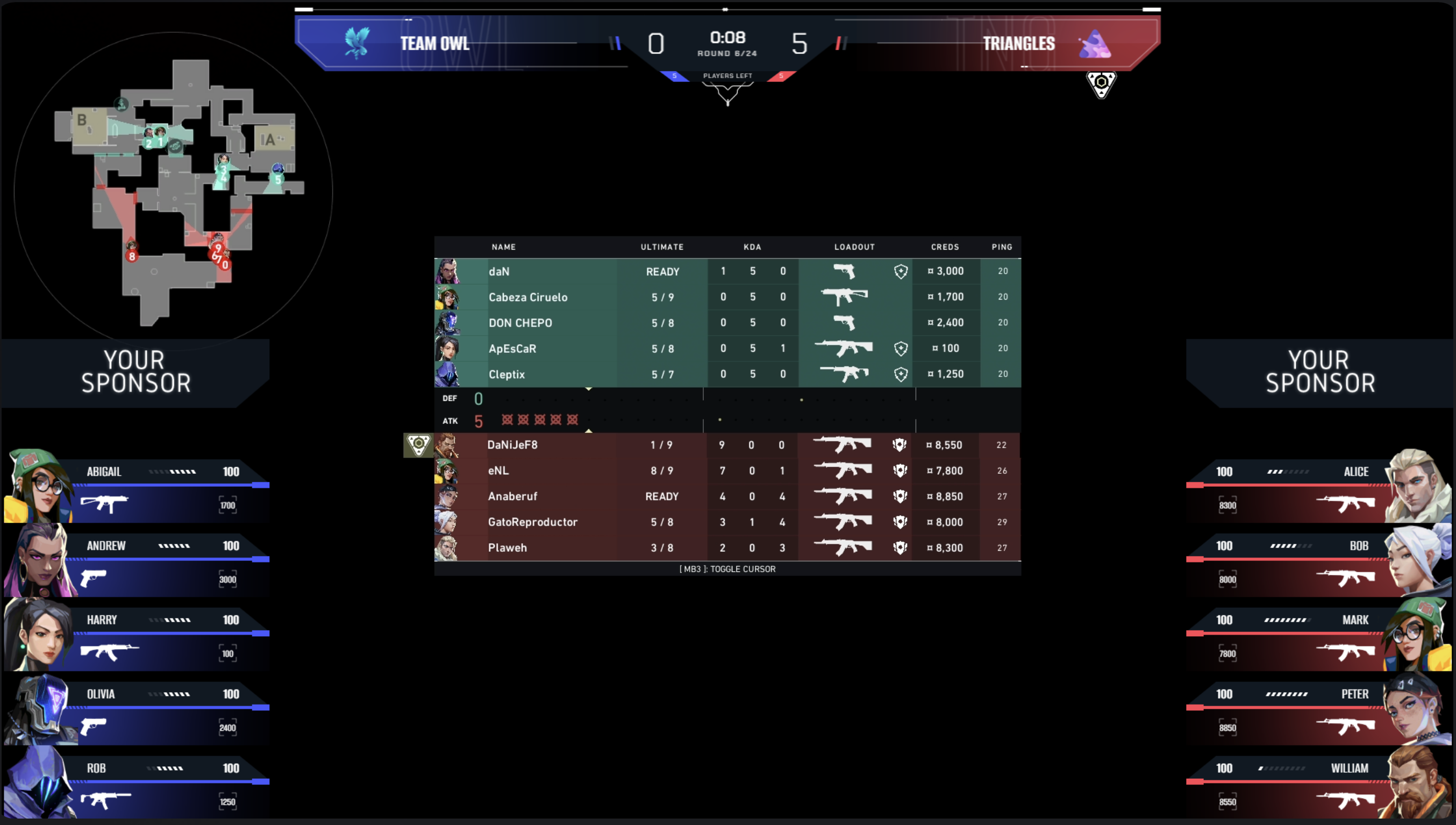
Team names and logos should be visible and consistent across the matchbar, scoreboard, lower thirds, and break screens. This sounds basic, but inconsistent team abbreviations or missing logos make a broadcast feel unfinished and can confuse viewers joining mid-series.
Score and round count should sit in a fixed, easy-to-read position. Viewers need to understand the map score instantly, especially around swing rounds, halftime, overtime, and match point.
Map name and match format matter more than many designers expect. A 10–8 score in a BO1 does not feel the same as a 10–8 score in map two of a BO5. The overlay should make the wider series context clear without forcing the casters to repeat it constantly.
Round timer should always be readable. In Valorant, time pressure changes how a round is interpreted. A team holding outside a site with 1:10 left is still setting up. A team doing the same thing with 0:18 left is under pressure.
Spike status is central to the broadcast. The overlay should make it clear when the spike is carried, dropped, planted, or being contested. Spike information helps viewers understand why attackers slow down, why defenders rotate, and why a player may choose to save instead of retake.
Player names and agent icons help viewers connect action to identity. This is especially important for newer viewers who may recognize an agent before they remember a player name.
Health, armor, and alive/dead state should be readable in one glance. A 3v3 retake with three healthy players is not the same as a 3v3 where two players are one shot from dying.
Weapons explain the real strength of a round. A team with five players alive but weaker weapons may still be at a disadvantage against rifles, Operators, or upgraded sidearms in close angles.
Credits and economy information help viewers understand whether a team is playing a full buy, half buy, eco, force buy, or bonus round. Riot’s official guide describes the pre-round buy period and credits as part of the round structure, which makes economy a natural part of broadcast context.
Ultimate status should be visible because ultimates shape executes, retakes, site control, and clutch potential. Hiding ultimate information makes it harder for viewers to understand why a team waits, why defenders stack a site, or why a caster is focused on one player’s position.
Available utility can be useful, but only if it stays readable. A broadcast overlay does not need to show every small detail at all times if that detail turns the player panel into a dense block of icons.
Team side should be clear. Attack and defense affect the meaning of time, spike state, map control, and economy decisions.
Round history is useful between rounds, during tactical pauses, or in an expanded scoreboard view. It helps show streaks, resets, conversions, and momentum without requiring a long verbal recap.
Series score is needed for BO3 and BO5 matches. Viewers should know whether a team is fighting for the map, the series, or survival.
Event branding and sponsor placements should be planned early, not added after the gameplay information is already designed. Branding should frame the broadcast. It should not compete with the HUD.
Player Status Information
Player panels are one of the most important parts of any Valorant overlay. They are the viewer’s quickest way to understand the real state of the round outside the current observer camera.
A strong player panel should show:
- Player name
- Agent
- Health
- Shield status
- Weapon
- Ultimate progress or availability
- Alive/dead state
- Spike carrier indicator, where applicable
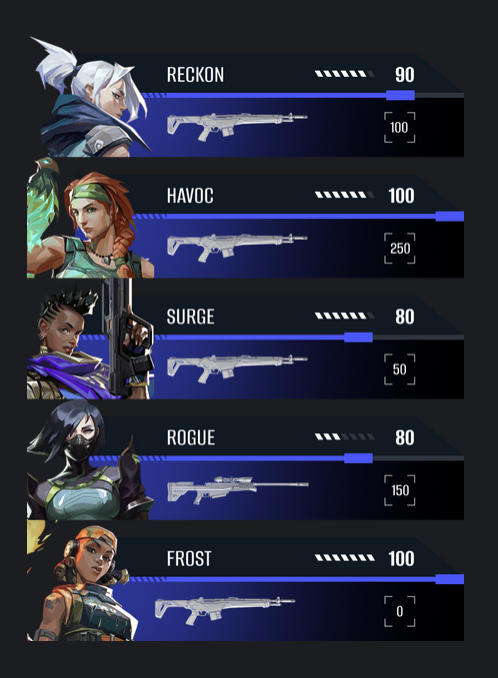
This information has to be readable during movement, gunfights, ability usage, and observer cuts. Valorant rounds do not pause while viewers decode the overlay.
The panel should also avoid visual noise. If the agent icon, weapon icon, health number, shield indicator, and ultimate marker all fight for attention, the panel becomes slower to read. The goal is not to display the most information possible. The goal is to display the right information in the right order.
A practical test is simple: pause a round during a 4v3 retake and look at the overlay for one second. You should be able to tell who is alive, who is low, who has the spike pressure, and whether any ultimate could change the round. If that takes longer, the panel needs work.
Economy and Buy Phase Information
Economy is one of the main reasons Valorant broadcasts need more than a basic scorebug.
The buy phase tells viewers what kind of round they are about to watch. A full buy suggests a fair fight. A force buy suggests risk. A half buy suggests a team is balancing this round against the next one. An eco round can still be dangerous if players have close-range weapons, upgraded pistols, or ultimates ready.
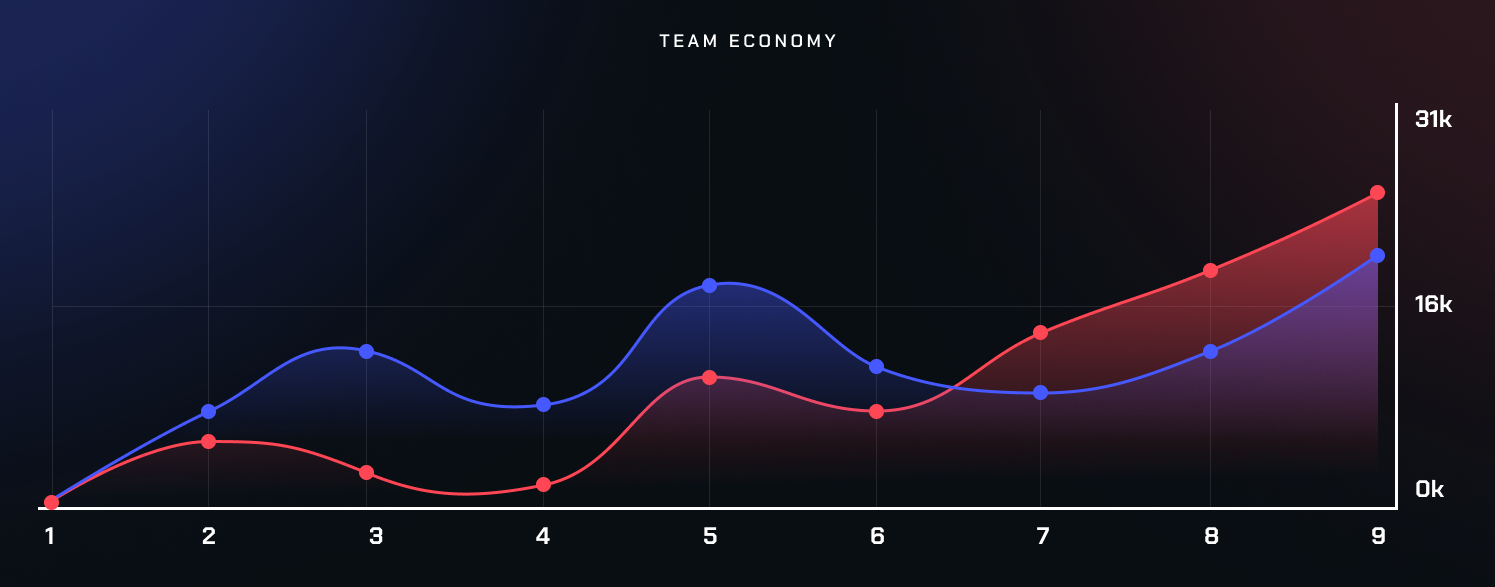
A useful Valorant production setup should make these elements clear:
- Credits
- Weapons
- Shields
- Ability investment
- Ultimate availability
- Full buy, half buy, eco, and force-buy situations
The overlay does not always need to label every round type explicitly. Often, the information itself is enough. If viewers can see credits, weapons, shields, and ultimate status, casters have the material they need to explain the story.
Economy also helps viewers understand pacing. A team with weaker weapons may play slowly to find a pick. A team with low credits may save after losing the spike site. A defender with a rifle and no money for the next round may avoid a low-percentage retake. Without economy context, those decisions can look passive or confusing.
Agent Utility and Ultimate Status
Valorant is different from many tactical shooters because agent abilities are not decorative. They control space, delay pushes, start executes, isolate fights, deny vision, and make retakes possible.
That makes ultimate status essential broadcast information.
If a team is one ultimate away from a strong execute, the overlay should help viewers see that before the push starts. If defenders have retake utility ready, the viewer should understand why they are willing to play back and give up the site. If a team saves key ultimates for the next round, that choice should make sense on screen.
Utility information is more difficult. Showing every available ability for every player may sound useful, but it can quickly crowd the HUD. The overlay should prioritize the information that viewers can actually process during a live round.
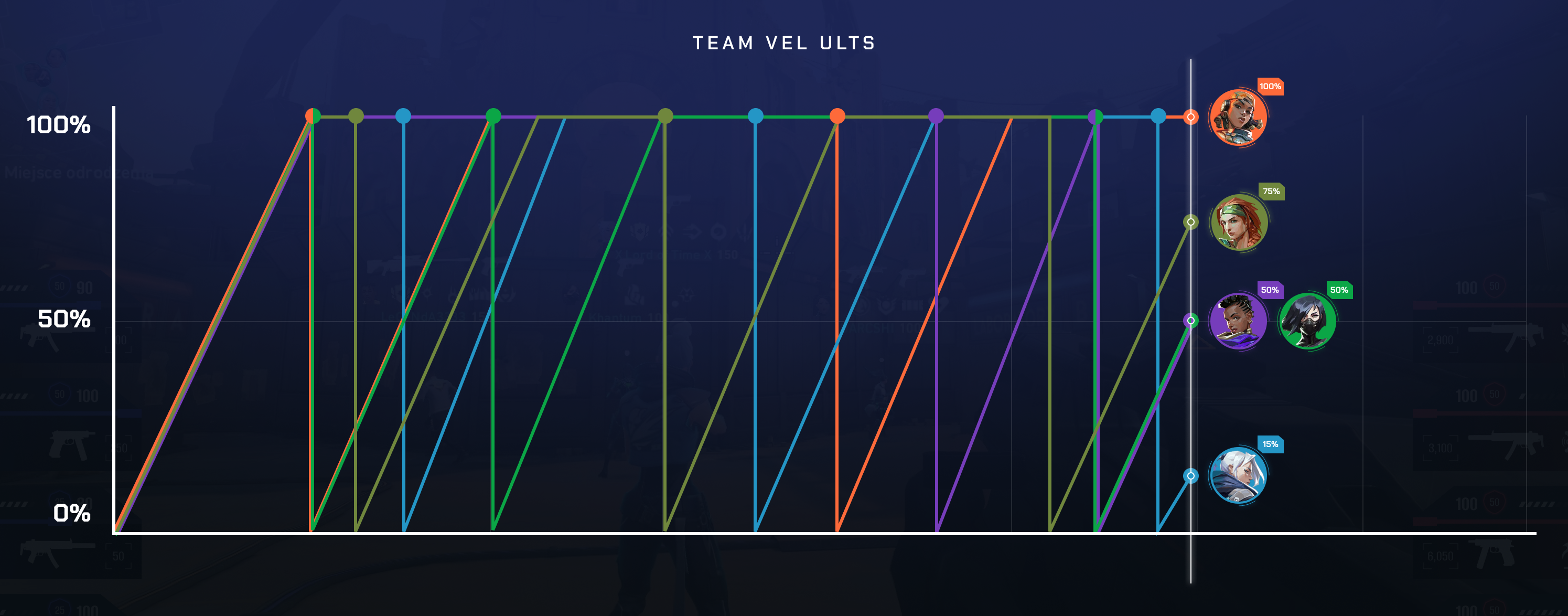
For example, it may be helpful to show clear ultimate availability throughout the round, while ability details can be shown in simplified form or emphasized through observer choices, caster commentary, replays, or expanded graphics. During a late retake, viewers usually need to know which players are alive, how much health they have, what weapons they carry, whether the spike is planted, and whether a major ultimate is available. Showing too many small ability icons can slow that reading down.
A good rule: if a data point does not help the viewer understand the next five seconds of the round, it may not need constant space on the main HUD.
Spike, Timer, and Round State
Spike and timer information should be impossible to miss.
The round timer tells viewers how much freedom the attacking side has. Early in the round, time supports map control and information gathering. Late in the round, the same clock creates pressure. After the spike is planted, the entire shape of the round changes.
A Valorant overlay should communicate:
- Round timer
- Spike carried, dropped, or planted state
- Spike carrier, where readable
- Spike location when relevant
- Attacker and defender side
- Player advantage or disadvantage
- Post-plant, retake, save, and clutch states
The spike timer can be useful, but it must be handled carefully. It should be readable, broadcast-safe, and visually distinct from the round timer. If it creates confusion or pulls attention away from the action, it needs a different treatment.
Viewers should not have to ask what phase the round is in. The overlay and observer feed together should make it clear whether the teams are in default, execute, retake, post-plant, save, or clutch territory.
Map and Tactical Context
Map information can help a Valorant broadcast, but it can also become distracting if it takes over the screen.
A minimap or radar-style element can support the observer feed by giving viewers context the camera cannot show at the same time: player positions, rotations, spike location, site pressure, and map control. This is useful during defaults, lurks, mid-round rotations, and retakes.
The danger is clutter. If the map is too large, too bright, or placed over important gameplay areas, viewers may stop watching the actual fight. The map should support the observer’s story, not compete with it.
Useful map-related overlay decisions include:
- Keeping the minimap readable but secondary.
- Avoiding placement over common crosshair or combat areas.
- Making spike location clear without excessive animation.
- Using map context more heavily during pauses, analysis segments, or replay breakdowns.
- Letting the observer feed remain the main source of action.
For many broadcasts, the main gameplay view should stay clean during active rounds, while deeper tactical context appears in replays, desk segments, or full-screen analysis graphics.
Branding and Event Identity
A Valorant tournament overlay also carries the event identity. Colors, typography, motion language, sponsor placement, lower thirds, break screens, match cards, and social graphics should feel connected.
Branding works best when it respects the gameplay.
Strong branding can make a tournament recognizable, but it should not make player names smaller, reduce team contrast, hide the spike state, or crowd the score area. Sponsor logos need planned space. They should not be pushed into the player panels or placed near critical round information just because there is no other room.
A useful event package usually includes:
- In-game HUD treatment
- Matchbar and score area
- Player panels
- Scoreboard or expanded stats screen
- Map veto or map selection graphics
- Lower thirds
- Break and countdown screens
- Pause and technical issue states
- Sponsor loops or sponsor panels
- Social and promotional graphics
The broadcast should feel consistent across all of these assets. But during live gameplay, clarity wins.
Readability and Layout Principles
A Valorant overlay is only good if viewers can read it quickly.
Strong contrast is the starting point. Team colors, text, icons, and backgrounds must hold up on different maps, lighting conditions, stream bitrates, and screen sizes. A design that looks clean on a 27-inch production monitor may fail on a mobile screen.
The layout should have a clear hierarchy. Score, timer, spike, alive count, player status, and ultimates should not all have the same visual weight. The most urgent information needs the clearest treatment.
Good layout decisions include:
- Clear team separation
- Consistent icon style
- Enough spacing between data points
- Readable text sizes
- Fixed positions for recurring information
- Minimal animation during active rounds
- Safe placement away from important gameplay areas
Bad overlay decisions usually show up quickly in real matches:
Small player names may look elegant in a mockup but become unreadable during a fast observer cut. Agent icons can look too similar if they are reduced too far. Sponsor logos placed close to the score can make the matchbar harder to parse. Animated elements during executes can pull attention away from the crosshair. Economy information may technically be present but still useless if it requires squinting.
Readability should be tested during messy rounds, not only clean screenshots.
Custom Valorant Overlay vs Basic Broadcast Graphics
Not every Valorant event needs a complex custom overlay.
A small community tournament, internal event, early test broadcast, or low-budget production may be better served by a simple setup that makes the score, teams, timer, player status, and spike state clear. Basic clarity beats a complex design that fails during live rounds.
A custom Valorant overlay becomes more useful when the event has larger production needs:
- Larger tournaments
- Recurring leagues
- Sponsor-heavy broadcasts
- Branded event packages
- Multilingual or regional productions
- Broadcasts with dedicated observers and technical staff
- Events that need consistent graphics across gameplay, breaks, veto, desk, and social assets
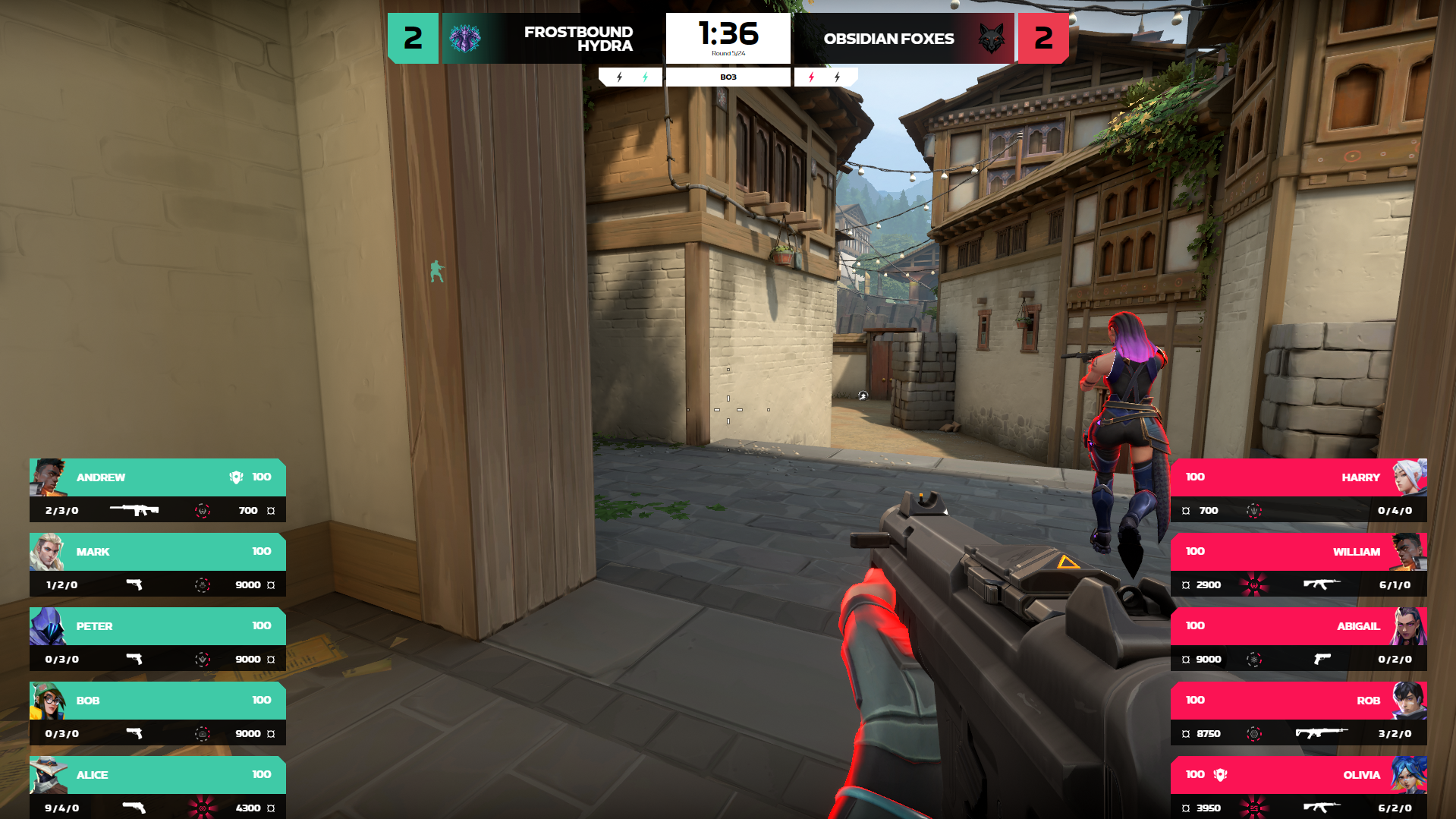
For teams that need more than a ready-made HUD, LHM offers custom Valorant HUD implementation, including tailored design, branded layouts, sponsor placements, additional broadcast screens, and event-specific functionality for Valorant productions.
How to Plan a Valorant Overlay Before Production
Planning should start before the first design mockup.
1. Define the tournament format
Confirm whether the event is BO1, BO3, BO5, league play, bracket play, showmatch, qualifier, or finals format. This affects the matchbar, series score, map veto graphics, lower thirds, and scoreboard states.
2. Decide what must always be visible
Score, timer, teams, player status, alive/dead state, spike information, and core round context usually need constant space. Put these elements first.
3. Decide what appears only in specific moments
Economy breakdowns, round history, expanded scoreboard views, map veto graphics, sponsor panels, and post-round stats may not need to sit on the screen during every second of gameplay.
4. Prepare all event assets
Collect team logos, player names, player photos if needed, agent assets, sponsor materials, event branding, map pool information, and naming rules before production day.
5. Define the visual hierarchy
Decide what viewers should notice first, second, and third. If everything is visually loud, nothing is clear.
6. Design the player panels and score area first
These are the core of the in-game HUD. If they work, the rest of the package has a stable base.
7. Test the overlay during real gameplay
Use actual Valorant footage or live test lobbies. Check buy phase, defaults, site hits, post-plants, retakes, saves, clutches, ult usage, round end, halftime, overtime, and pauses.
8. Check readability on different screens
Review the broadcast on a production monitor, laptop, tablet, and phone. Also check the stream after compression.
9. Prepare special states
Plan graphics for pauses, technical issues, overtime, map changes, side switch, series score updates, replay transitions, and sponsor reads.
10. Review with the people using it
Observers, casters, technical directors, broadcast producers, tournament admins, and organizers will notice different problems. Get feedback before the event, not during map one.
Where LHM Fits
LHM supports Valorant as part of its esports production workflow for multiple games. For Valorant broadcasts, LHM gives production teams access to HUD elements such as a custom matchbar with team names, logos, BO score, round indicator, and players left; side player panels with health, ultimate progress, weapon, credits, and spike indicator; a custom scoreboard; a team economy panel; an ult progress panel; round-end indicators; LHM Cameras support; and custom image bars for sponsor or tournament logos.
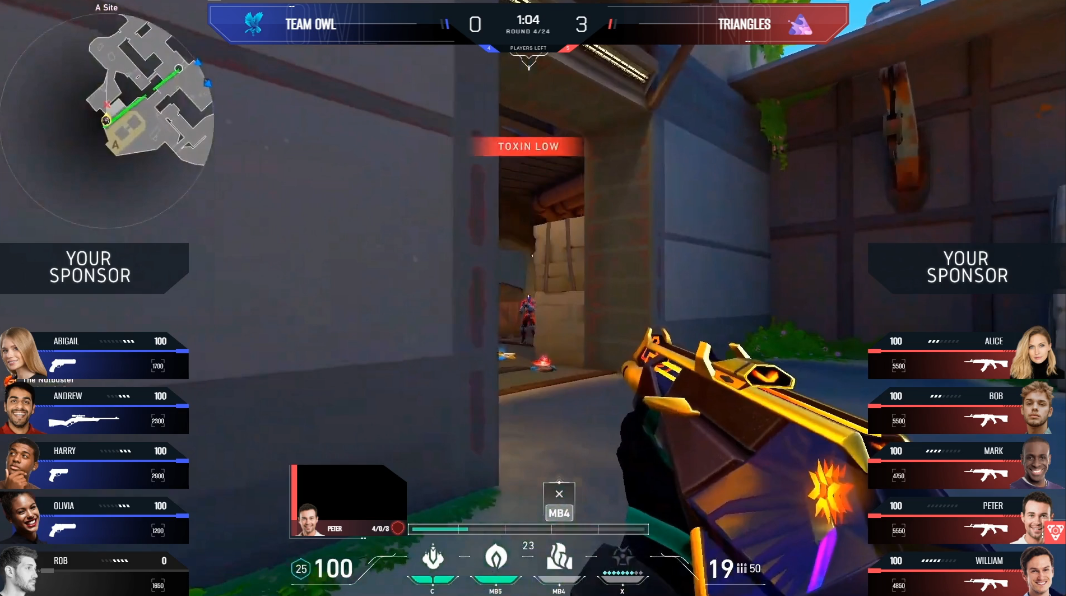
For teams that need a ready-made Valorant broadcast HUD, Valorant Premium HUD is available in LHM for Personal, Professional, and Enterprise plan owners. It includes the core matchbar, side player panels, scoreboard, round-end indicators, and camera support. Professional and Enterprise plans also add the scoreboard panel, team economy panel, ult progress panel, post-game MVP panel, and several color palettes.
For teams that need more than a ready-made HUD, LHM also offers custom HUD implementation for Valorant broadcasts, including tailored design, branded layouts, sponsor placements, and event-specific functionality.
Design the Overlay Around the Round
A good Valorant overlay makes the match easier to follow.
It should show the score, teams, player status, economy, spike state, timer, side, weapons, ultimates, and key series information without covering the action. It should help casters explain why a team is saving, forcing, rotating, delaying, committing, or playing for a retake. It should also give the tournament a recognizable visual identity without making the HUD harder to read.
More information is not always better. Valorant already gives viewers a lot to process. The overlay should reduce that load, not add to it.
Before the event goes live, test the overlay in real match situations: buy phases, fast executes, slow defaults, post-plants, retakes, clutches, overtime, pauses, and technical delays. The best test is not whether the design looks good in a screenshot. It is whether viewers can understand the round while it is happening.
If you are planning a Valorant tournament broadcast, start with LHM’s Valorant Premium HUD if you need a ready broadcast package.
FAQ
What is the most important information in a Valorant overlay?
The most important information is the current match state: score, round timer, team names, player status, alive/dead state, spike status, weapons, economy, and ultimate availability. These elements explain what is happening now and what each team can realistically do next.
Should a Valorant overlay show every ability?
Not always. Ability information can help viewers understand executes and retakes, but too many small icons can crowd the HUD. Ultimate status usually deserves consistent visibility. Regular utility should be shown only when it stays readable and supports the round story.
Why is economy information important in Valorant broadcasts?
Economy explains risk. Credits, weapons, shields, and ability investment help viewers understand why a team is saving, forcing, playing slowly, hunting exits, or avoiding a low-percentage retake.
When does a tournament need a custom Valorant overlay?
A custom Valorant overlay makes sense for larger tournaments, recurring leagues, sponsor-heavy events, branded broadcasts, multilingual productions, and shows that need a consistent full graphics package. Smaller events may be better served by a simpler setup focused on clarity.
What should be tested before using a Valorant overlay live?
Test the overlay during buy phase, full buys, eco rounds, force buys, executes, retakes, post-plants, clutches, saves, side switch, overtime, pauses, technical delays, map changes, and series score updates. Also test readability after stream compression and on smaller screens.